Arduino is a small programmable board with a microcontroller that reads sensors and controls LEDs, motors and displays. The best first board is the Arduino Uno: install the free Arduino IDE 2, connect the board over USB, open the Blink example and upload it. Your first LED will be blinking within 15 minutes.
Arduino is an open platform: its schematics and software are public, so there are thousands of free tutorials, libraries and compatible boards. This guide explains what is on the board, which model to choose, how to install the software, walks through your first code line by line and gives you a 30-day plan.
What is Arduino and what does it do?
At the heart of every Arduino is a microcontroller: a tiny computer on a single chip. It is far weaker than a laptop, but it has one big advantage: it talks directly to electronics. Through its pins it notices a button press, light, distance or temperature, and in response it lights an LED, turns a motor or makes a sound.
Every Arduino project has three parts:
- Input: a button, a potentiometer, a sensor;
- Processing: your program (a "sketch") that decides what happens;
- Output: an LED, a buzzer, a servo, a display.
That is how an automatic plant waterer, a night light, a temperature monitor or a robot that avoids walls works. Arduino code is written in C++, but a beginner needs only a handful of commands.
The Arduino Uno: what's on the board
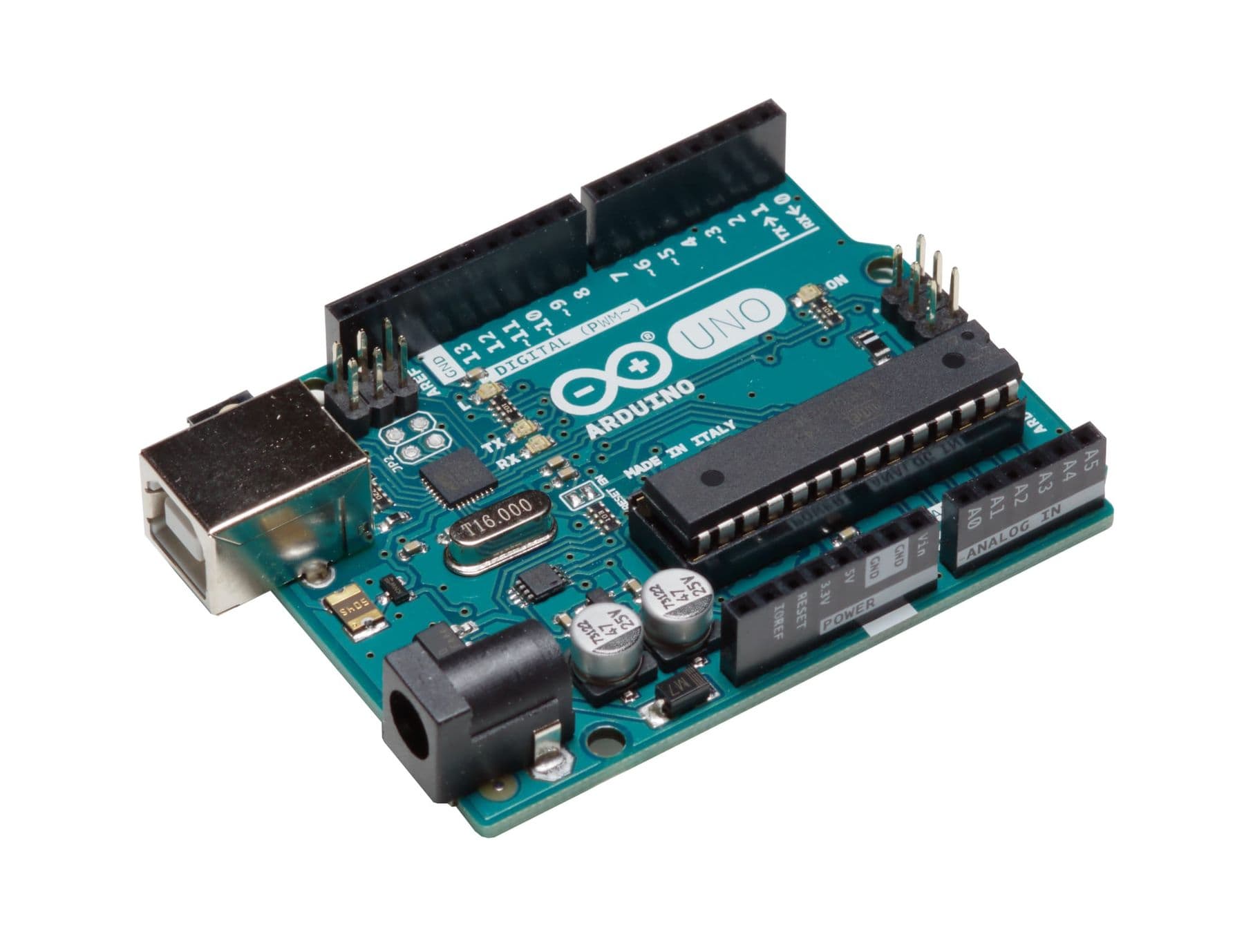
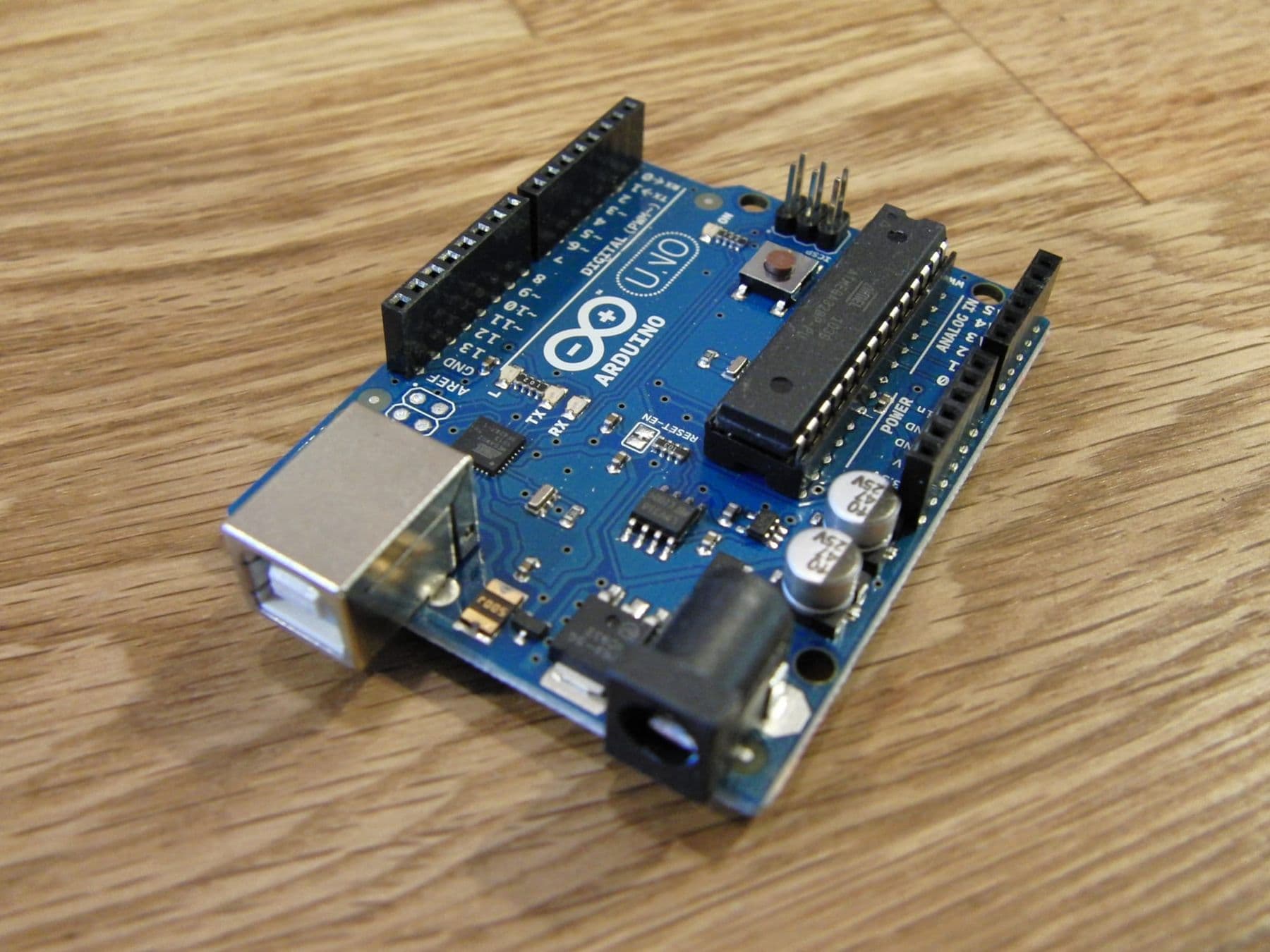
The Arduino Uno R3 is the most common board, and almost every tutorial is written for it. Its main parts:
- The ATmega328P microcontroller, running at 16 MHz, with 32 KB of flash (for your program) and 2 KB of SRAM.
- Digital pins 0–13. They work in two states: HIGH (5 V) and LOW (0 V). Six of them (marked ~) support PWM, which lets you dim an LED or set a motor's speed.
- Analog inputs A0–A5. They read a voltage from 0 to 5 V and turn it into a number from 0 to 1023.
- Power pins: 5V, 3.3V and GND (ground, minus).
- USB port (Type-B): powers the board and uploads programs.
- Power jack: for external power, 7–12 V recommended.
- A built-in LED on pin 13 and a reset button that restarts your program.
Remember one number: each Uno R3 pin can supply 20 mA. That is enough for an LED (with a resistor) but not for a motor. Motors need a separate driver and their own power supply.
Which board to choose: Uno, Nano, Mega or ESP32?
| Board | Chip and clock | Memory (flash / SRAM) | Pins and voltage | Best for |
|---|---|---|---|---|
| Uno R3 | ATmega328P, 16 MHz | 32 KB / 2 KB | 14 digital (6 PWM), 6 analog, 5 V | first board, most tutorials |
| Uno R4 Minima | Arm Cortex-M4, 48 MHz | 256 KB / 32 KB | 14 digital, 6 analog, 5 V, USB-C | a faster Uno |
| Uno R4 WiFi | same + ESP32-S3 | 256 KB / 32 KB | Wi-Fi, Bluetooth, 12 × 8 LED matrix | connected projects |
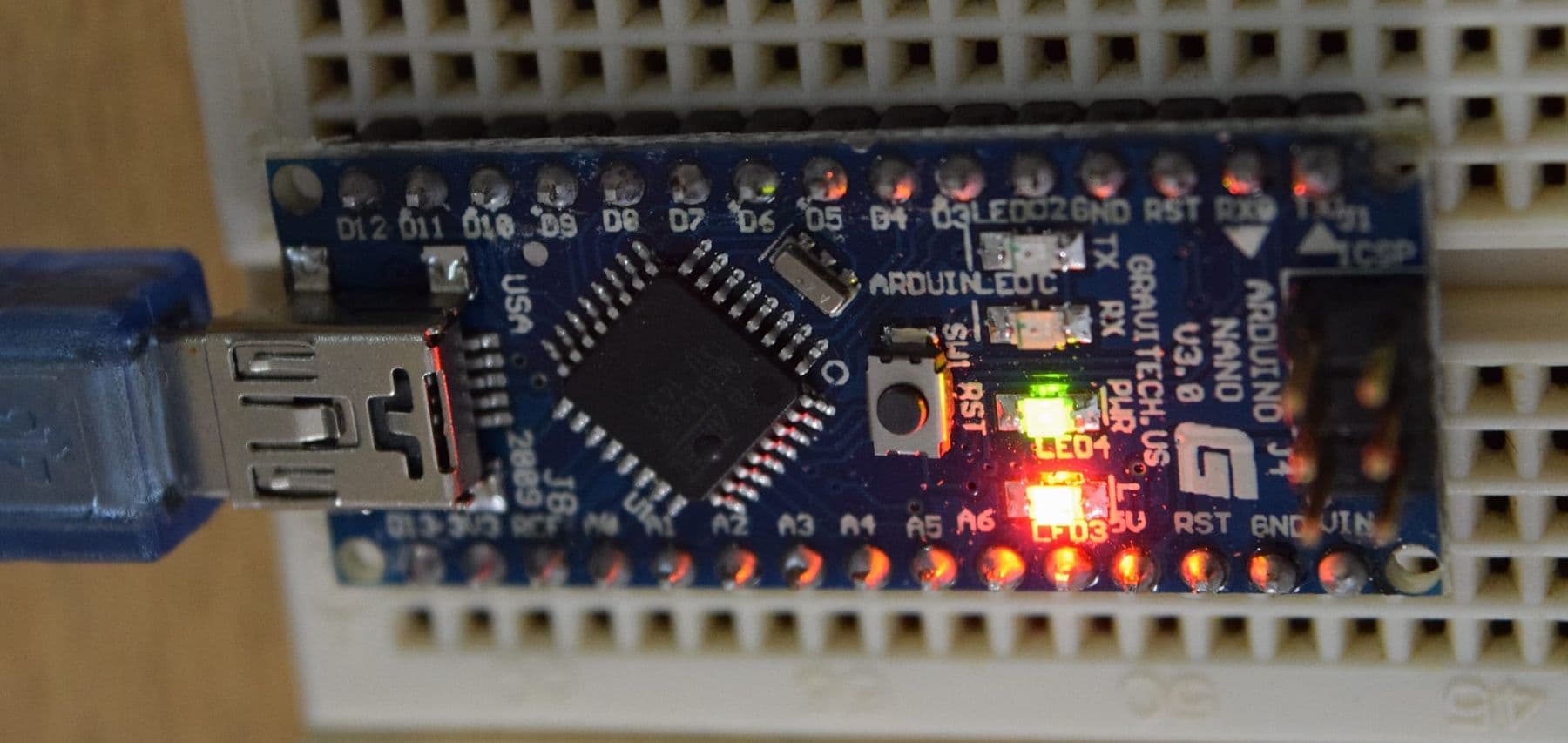
| Nano | ATmega328, 16 MHz | 32 KB / 2 KB | 8 analog, 5 V, 18 × 45 mm | compact builds, fits a breadboard |
| Mega 2560 | ATmega2560, 16 MHz | 256 KB / 8 KB | 54 digital (15 PWM), 16 analog | many sensors and motors |
| ESP32 | dual-core, up to 240 MHz | 520 KB SRAM | Wi-Fi, Bluetooth, 3.3 V | smart home and IoT |
Our advice: start with an Uno R3 or Uno R4 Minima. The R4 is faster with much more memory, but note one difference: its pins supply only 8 mA, so use a 470 Ω resistor for an LED instead of 220 Ω. The Nano is essentially an Uno in a smaller package, great for compact projects. The ESP32 can also be programmed in the Arduino IDE, but it runs at 3.3 V and shines in Wi-Fi projects (see our DIY smart home with ESP32).
As of October 2026, the official Arduino store lists the Uno R3 at about 29 euros, the Uno R4 Minima at 22 euros and the Nano at 27 euros. Compatible clones cost much less and work fine for learning. In autumn 2025 Arduino also released the UNO Q, a "two-brain" board with a Linux processor plus a microcontroller, but it is more than a beginner needs. For a full parts list with price ranges, see our robot components guide.
How to install Arduino IDE 2
The Arduino IDE (Integrated Development Environment) is the free program where you write code and upload it to the board. As of October 2026 the current version is 2.3.10, available for Windows, macOS and Linux.
- Download the IDE from the official page, arduino.cc/en/software, and install it.
- Connect the board with a USB cable. It must be a data cable: some cheap cables only charge.
- In the top bar choose your board (for example Arduino Uno) and the port. On Windows the port looks like COM3; on macOS it starts with /dev/cu.usbmodem.
- For an Uno R4 the IDE will offer to install the board package in the Boards Manager: accept it.
- If a clone board does not show up as a port, it often uses a CH340 chip that needs its driver installed.
If you would rather not install anything, the Arduino Cloud Editor runs in your browser. And you can test code without any board in the Tinkercad Circuits simulator.
Your first program: Blink, line by line
Open File → Examples → 01.Basics → Blink. This is Arduino's official first example: the built-in LED goes on for a second and off for a second.
// setup() runs once: at power-up or when you press reset
void setup() {
  pinMode(LED_BUILTIN, OUTPUT);     // the built-in LED pin (13 on the Uno) is an output
}

// loop() repeats forever
void loop() {
  digitalWrite(LED_BUILTIN, HIGH);  // 5 V on the pin: the LED turns on
  delay(1000);                      // wait 1000 milliseconds, i.e. 1 second
  digitalWrite(LED_BUILTIN, LOW);   // 0 V on the pin: the LED turns off
  delay(1000);
}
What each line does:
- setup() runs once; this is where initial settings go.
- loop() repeats endlessly, potentially thousands of times a second. Your main logic lives here.
- pinMode(pin, OUTPUT) tells the board that the pin controls something rather than reads it.
- digitalWrite(pin, HIGH / LOW) switches the voltage on the pin on or off.
- delay(1000) pauses the program for 1000 milliseconds.
Click the Upload arrow. A few seconds later the LED blinks. Now change 1000 to 200 and upload again: it blinks faster. To use an external LED, run pin 13 through a 220 Ω resistor and an LED to GND; the step-by-step wiring is in your first electronic circuit on a breadboard.
The Serial Monitor: how Arduino talks to your computer
The Serial Monitor is a window in the IDE where the Arduino sends you text and numbers. It is your main debugging tool. Connect a 10 kΩ potentiometer: outer legs to 5V and GND, middle leg to A0.
void setup() {
  Serial.begin(9600);                  // connection speed: 9600 bits per second
}

void loop() {
  int value = analogRead(A0);          // a number from 0 to 1023
  float volts = value * 5.0 / 1023.0;  // convert to volts
  Serial.print("A0 = ");
  Serial.print(value);
  Serial.print("   V = ");
  Serial.println(volts);
  delay(200);
}
Upload, open Tools → Serial Monitor and pick 9600 baud in the corner. As you turn the knob the number moves between 0 and 1023, and the Serial Plotter draws the same data as a graph. This is exactly how an Arduino reads any analog sensor: a photoresistor, a soil moisture probe, a joystick.
A 30-day plan: from zero to your first project
Thirty to forty-five minutes a day is enough. The key is to get something working every day.
| Week | Topic | Practice | You learn |
|---|---|---|---|
| 1 | Digital output and input | Blink, a 3-LED traffic light, a button | pinMode, digitalWrite, digitalRead, if/else |
| 2 | Analog signals | potentiometer, PWM fading, Serial Monitor | analogRead, analogWrite, variables |
| 3 | Sensors and motion | distance sensor, photoresistor, buzzer, servo | libraries, tone(), Servo |
| 4 | Your own project | parking sensor or automatic lamp | combining it all, functions |
For week-four ideas, see our list of 15 Arduino projects for beginners; if you want a robot, follow how to build your first robot.
Never write the whole program at once. Get one sensor working and watch its value in the Serial Monitor, then add the LED, then the motor, uploading and testing after every step. That way the bug is always in the last thing you added.
Common beginner mistakes
- No port shows up. Try another USB cable (a data one) and another port; install the CH340 driver for clones.
- Wrong board selected. The upload fails or the board behaves oddly. Check the top bar.
- Pins 0 and 1 in use. USB serial runs through them, so beginners should leave them free.
- An LED with no resistor. You can damage the pin. Use 220 Ω on an Uno R3, 470 Ω on an R4.
- A motor straight on a pin. A motor needs far more current than a pin can give. Use a driver (L298N, TB6612) and a separate battery.
- A 5 V sensor on a 3.3 V board. ESP32 pins are not designed for 5 volts; check voltages first.
- A missing semicolon. C++ statements end with ";". The error panel at the bottom of the IDE tells you the line number.
Where to learn Arduino in Tbilisi: courses for kids and teens
There is plenty of free material: the examples built into the IDE (File → Examples), Arduino's official documentation and Tinkercad Circuits. For a child, though, a mentor who helps when nothing works, and a ready kit so no time is lost hunting for parts, often make the difference.
On our Electronics and Smart Devices course, students aged 10–13 program Arduino in C++: electricity basics and LEDs first, then sensors (ultrasonic, line sensor, push button, DHT11), displays, a servo, and finally their own smart device with a 3D case designed in Tinkercad. The course runs for two months, on-site and in Georgian, and every student keeps an electronics mega kit.
Teens aged 13–17 can take the Electronics and Robotics (Advanced) course: digitalWrite, analogRead, PWM, libraries, RFID and soil sensors, a 4WD robot with Bluetooth and a robotic arm. Both courses are compared side by side on our electronics and Arduino courses page. We do not currently run an Arduino course for adults; if you are unsure which direction suits you, get in touch.
Frequently asked questions
What is Arduino in simple terms?
Arduino is a small board with a microcontroller that you program from your computer. Following your program, it reads sensors and controls LEDs, motors and displays. People use it to build robots, smart home gadgets, weather stations and school projects.
Arduino Uno or Nano: which is better for beginners?
The Uno is easier to handle: big headers, clear labels, and every tutorial uses it. The Nano has the same chip in a tiny package that plugs into a breadboard, which suits compact builds. Start with an Uno and use a Nano for your second project.
What language is Arduino programmed in?
In the Arduino IDE you write C++ with Arduino's simple functions (digitalWrite, analogRead, delay). For kids there is block coding too, for example in Tinkercad Circuits, which shows the C++ behind the blocks. Boards like the ESP32 can also run MicroPython.
How long does it take to learn Arduino?
With half an hour a day you will have the basics (LEDs, buttons, sensors, Serial Monitor) in 3–4 weeks, and a first independent project such as a parking sensor by the end of the first month. Robots and Wi-Fi projects take another one or two months of practice.
How much does an Arduino cost?
As of October 2026, the official Uno R3 costs about 29 euros and the Uno R4 Minima 22 euros. Compatible clones and starter kits are cheaper, both in local electronics shops and online, and a good clone is perfectly fine for learning.
Can a 10-year-old learn Arduino?
Yes, if they can use a computer and follow instructions carefully. Children aged 10–13 usually start with Tinkercad Circuits and a mentor. For younger kids (7–10), Scratch and mBot are a better first step.
If you are not sure which course suits your child or when to start, book a free consultation and we will find the right starting point together.
Sources
- Arduino UNO R3 tech specs, Arduino Store
- Arduino UNO R4 Minima tech specs, Arduino Store
- Arduino UNO R4 WiFi tech specs, Arduino Store
- Arduino Nano tech specs, Arduino Store
- Arduino Mega 2560 Rev3 tech specs, Arduino Store
- Arduino IDE and Cloud Editor downloads, Arduino
- Blink example source code, Arduino on GitHub
- ESP32-DevKitC (ESP32 features), Zephyr Project documentation